
Evading Gatekeeper: Initial Access in Enterprise macOS Environments
Table of Contents
Introduction
During a recent Red Team engagement, we needed a new payload delivery mechanism for a spear phishing campaign. In most of our engagements, the target organizations operate within Windows environments, where tradecraft, tooling, and documented TTPs are widely available and mature.
However, in this case, the target organization primarily used macOS systems and had a high level of security awareness against social engineering attacks. Due to these circumstances, combined with the comparatively less mature and less widely documented macOS-focused initial access tradecraft, we needed to design and adapt techniques to reach our targets.
Unlike Windows-based operations, macOS introduces distinct architectural and security controls like Gatekeeper enforcement, XProtect, System Integrity Protection (SIP), and Transparency, Consent, and Control (TCC) restrictions. These controls significantly reduce the effectiveness of traditional payload delivery and execution techniques commonly used in phishing campaigns.
This post describes the delivery setup we built and the techniques we adapted to obtain initial access in the target environment.
macOS Gatekeeper Evasion
To design stable and reliable tradecraft, the setup needs to meet the following requirements: a well-developed delivery method with a credible pretext that would allow us to execute the payload under the radar of built-in macOS security controls and EDR solutions.
Of the native controls listed in the introduction, Gatekeeper is the first one a delivery chain must contend with, so identifying a macOS Gatekeeper evasion method became our initial focus.
Gatekeeper’s main objective is to ensure that only trusted software runs on the system, verifying that applications that are downloaded or come from external sources are signed with a valid developer ID recognized by Apple and, in many cases, that they have passed through the notarization process (an automated Apple analysis that scans for malicious code).
In general, bypassing Gatekeeper requires one of four things (or a combination):
- A vulnerability in the assessment chain itself.
- Software or workflows that fail to apply or propagate the
com.apple.quarantineattribute correctly (or are designed not to apply it). - Abuse of valid code signing certificates and notarization.
- Social engineering tactics that convince the user to perform a specific sequence of actions to execute the payload while circumventing the protection.
To achieve our goal, the starting point was to revisit a known primitive: mounting remote network shares to stage and execute payloads from outside the local filesystem. This approach could potentially combine the quarantine attribute propagation gap with user interaction, drawing on two of the four categories above.
Several connection methods were tested, including URL handlers for .inetloc files and the native open command to connect to the remote location using different protocols such as WebDAV, FTP, AFP, or SMB.
When using these methods, we observed that the quarantine attribute was properly applied to the remote files, triggering the standard Gatekeeper validation upon execution.
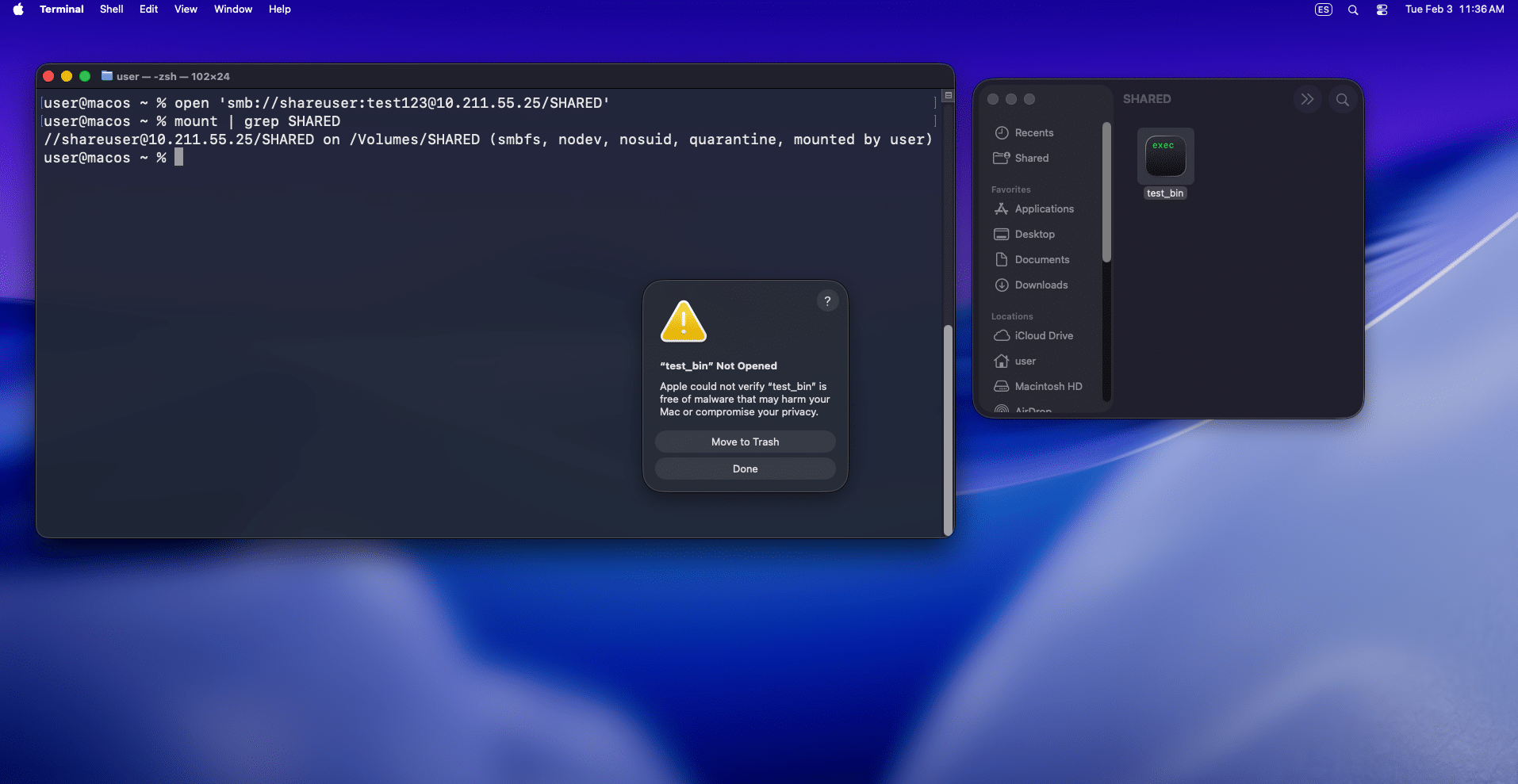
This behavior became the foundation of our macOS Gatekeeper evasion approach. However, we quickly found an exception: when Finder was used to mount the remote location via the Connect to Server top menu option (Cmd + K) using SMB, the remote files were not quarantined:

Even though this requires quite a bit of user interaction, we sketched out a few scenarios where a user could be tricked into opening a remote location using this method to trigger a payload.
We are aware we are not the first to observe this; as we found later, there is at least a post by Karol Mazurek that documents the same behavior via WebDAV. Nevertheless, we believe it remains relatively unknown and can still be weaponized effectively, as demonstrated below.
Payload Design
After finding a way to trigger a payload without being affected by the quarantine attribute, the next question was what to actually execute. At this point, our focus shifted from the built-in security controls in macOS to the EDR running on the target systems.
We found that, of the available options, application bundles offer the most flexibility from a user experience perspective: they launch with a double click, and their icon and name can be customized to make them look like an ordinary document.
Application bundles are a well-known macOS feature composed of a structured combination of files and directories. The typical structure of these directories and files is as follows:
Payload.app/
  Contents/
    Info.plist
    MacOS/
      Executable
    Resources/
    Frameworks/
    Plugins/
    _CodeSignature/
To summarize, the Info.plist file contains a reference to an executable stored in the Contents/MacOS directory. This executable could be a compiled binary or a script.
Luckily, we had access to a macOS environment running the same EDR as our target, so the remaining challenge was finding a way to execute our agent without being detected.
A few things worked well for us during this process. First, we used a script as the main executable, but instead of Bash we switched to Perl (currently shipped with macOS) to avoid a detection that flagged the execution of Bash scripts. This is as simple as using a Perl shebang at the top of your script:
#!/usr/bin/perl

use strict;
use warnings;
use File::Path qw(make_path);
use File::Basename;
use File::Copy;
use POSIX qw(setsid);
use Archive::Zip;

...
Second, we followed a Bring-Your-Own-Interpreter (BYOI) strategy to execute our agent. We bundled a ZIP containing a Python installation inside the application bundle, and our Perl script extracted it to ~/Library/Application Support/. The goal was to blend in by leveraging a binary that is trusted and commonly used on macOS.
Third, instead of executing our Python loader directly, the application bundle wrote a new LaunchAgent .plist file. This was handy for two reasons:
- To set up a persistence mechanism ensuring that the agent will execute automatically upon user login, decoupling the agent’s execution from the application bundle.
- To set up some environment variables required for our newly deployed Python installation.
<?xml version="1.0" encoding="UTF-8"?>
<!DOCTYPE plist PUBLIC "-//Apple//DTD PLIST 1.0//EN" "http://www.apple.com/DTDs/PropertyList-1.0.dtd">
<plist version="1.0">
<dict>
    <key>Label</key>
    <string>com.sometool.support.update</string>

    <key>ProgramArguments</key>
    <array>
        <string>/Users/<username>/Library/Application Support/com.sometool.support/sometool-python3</string>
        <string>/Users/<username>/Library/Application Support/com.sometool.support/.resources/files/sometool-update.py</string>
    </array>

    <key>EnvironmentVariables</key>
    <dict>
        <key>DYLD_FALLBACK_FRAMEWORK_PATH</key>
        <string>/Users/<username>/Library/Application Support/com.sometool.support/.resources/files/Frameworks/</string>

        <key>DYLD_FALLBACK_LIBRARY_PATH</key>
        <string>/Users/<username>/Library/Application Support/com.sometool.support/.resources/files/Frameworks/lib</string>

        <key>PATH</key>
        <string>/Users/<username>/Library/Application Support/com.sometool.support/.resources/files/Frameworks/bin:/usr/local/bin:/usr/bin:/bin:/usr/sbin:/sbin</string>
...
</dict>
</plist>
Delivery Setup
We explored several scenarios to convince the user to mount the remote location via Finder. In the end, we chose one that also allowed us to reuse some TTPs that abuse how Gmail processes calendar meetings (you can read more about this in Abusing automatic calendar processing for initial access and lateral movement).
Using these tricks, we set up a legitimate-looking meeting with a pretext that justified having an external host (i.e., one of our operators). Our red teamer played the part and walked the targets through a slide deck describing a specific process (think of a training session, a vendor demo, or something along those lines).
One of the steps in that process was to open the remote location via Finder:
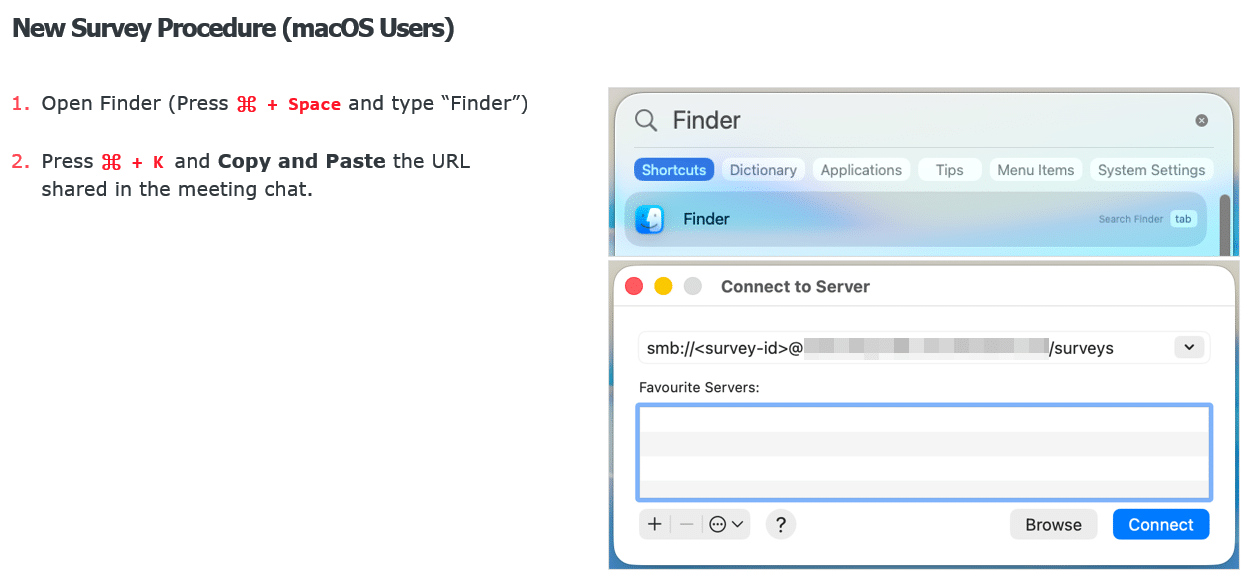
This worked well for several reasons. The live operator’s presence created social pressure to follow along in real time, the slide deck lent the instructions an air of legitimacy, and embedding the malicious step inside a longer sequence of mundane actions made it less likely to stand out.
Final Thoughts
As a result of this engagement, we learned that even in environments with a mature security posture, sometimes chaining simple ideas can yield significant results.
We ended up reporting the “Connect to Server” quarantine attribute propagation behavior to Apple and were told this feature is by design. While we can understand why, we think we proved how it can be weaponized even if you are protected by an EDR. Relying on default protections is insufficient, which highlights the need for advanced detection rules and monitoring.