
Pentesting Adobe Experience Manager (AEM) Applications
Table of Contents

Adobe Experience Manager (AEM) is an enterprise content management system developed by Adobe, widely used for the creation and administration of websites and digital forms. It is one of the most widely used CMS platforms in corporate environments and is used by numerous large and prominent organizations. The high level of AEM adoption means that any security flaw identified in the platform can have a significant impact, since it could potentially affect a large number of corporate environments.
However, AEM stands out for its high level of customization, which means that no two deployments are identical, making the generic, large-scale exploitation of vulnerabilities difficult in all scenarios.
AEM is typically deployed together with Adobe Dispatcher, a reverse proxy provided by Adobe that acts as an additional layer of protection. This component is responsible for filtering and blocking malicious requests before they reach the AEM instance, although vulnerabilities associated with this component have also been identified.
From a technological point of view, AEM is built on Java and runs on an OSGi (Open Services Gateway Initiative) container, typically using Apache Felix as the reference framework. This architecture enables component and service management, facilitating platform customization, although it also introduces additional complexity that must be taken into account from a security and environment configuration perspective.
Author vs Publish
AEM has two different instances, and it is important to distinguish between them because a misconfiguration can seriously affect application security.
First, we have the Author instance, which is where editors and administrators upload images or files, create new blog posts, and perform other administrative actions. This includes access to consoles and editors.
Then we have the Publish instance, which is the one seen by website visitors. In this instance, administrative consoles, authentication panels, and important endpoints are blocked for security reasons.
That is why, before publishing a website with AEM, it is important to make sure that the instance configured in production is Publish.
What is Dispatcher?
Dispatcher is a module developed by Adobe that is usually installed on a web server such as Apache or Nginx, although it is much more common to find it on the former.
Its function is to sit in front of AEM Publish as an intermediate layer that decides which requests can pass, which can be served from cache, and which must be forwarded to the backend.
In other words, Dispatcher is the first component that receives web traffic before AEM processes the request. It acts as a reverse proxy, as a caching mechanism, and also as a basic filtering layer.
This is important because it reduces the direct exposure of AEM: certain internal endpoints, administrative paths, or sensitive resources can be blocked before the request reaches Publish. In addition, it improves environment performance by serving previously cached content, which reduces server load and speeds up response times.
It should be emphasized that Dispatcher is not a substitute for a WAF such as Cloudflare; it only blocks certain requests and does not detect malicious payloads, SQL injections, etc.
Below, we will look at some examples of incorrect Dispatcher configurations that can be exploited by attackers. This will also be useful whether you are auditing a website that uses this content management system or developing a web application.
A very serious mistake would be to allow the /libs and/or /content endpoints, since this is where JSON files with information, internal consoles, and even the login panel are located.
/filter {

/0001 { /type "allow" /url "/libs/" } /0002 { /type "allow" /url "/content/" }

}
Another mistake would be to trust poorly configured weak regexes. This would undermine all the previous configurations because they could be bypassed. As shown in the example, access to the /libs endpoint is blocked (deny), while /content is allowed (allow).
/filter {
/0001 { /type "deny" /url "/libs/" } /0002 { /type "allow" /url "/content/" }
}
It would be possible to bypass this in several ways to access the login panel located in /libs by using path traversal, which would trick Dispatcher into believing that we are accessing /content.
/content/../libs/granite/core/content/login.html
/content/%2e%2e/libs/granite/core/content/login.html
/content/.;/libs/granite/core/content/login.html
/content/foo/../../libs/granite/core/content/login.html
Application structure
Let us assume that in our company we have several websites, all of them with AEM installed. For example, cyber.example.com and empleo.example.com could be two independent websites of the same company, but the content we can find on one domain and the other will be the same, since they share folders such as /content.
Introduction to AEM directories
Like any other content management system, AEM organizes much of its information into different directories whose exposure can be very useful during a security audit.
The following sections review some of the most important directories, what types of files can be found in them to enumerate website information, and what risks or attacks may exist if any of these resources are accessible from outside.
Directory /content – Published content and structure
As we saw earlier, multiple AEM instances can exist on the same server. It is important to know that the root starts the same for both domains; this is where the website content resides.
/content
Inside the /content directory, there are two additional folders, one for each of our websites.
/content/empleo-example
/content/cyber-example
Each of them stores the files related to its website, but the interesting part is that it is possible to access /content/empleo-example from cyber.example.com.
https://cyber.example.com/content/empleo-example
Each of these directories stores several files containing the node structure. These should not be visible because Dispatcher must block them if it is correctly configured.
/.json -> Directory structure
/.infinity.json -> Full node structure
These files are repeated in each of the directories and subdirectories.
Finally, the /content directory also contains the /content/dam folder. The word DAM stands for Digital Asset Manager. You could say it is like WordPress’s /wp-content folder, where PDF documents, images, videos, and other files are stored.
/content/dam/cyber-example/logo.jpg
/content/dam/empleo-example/logo.jpg
Directory /etc – Configurations
This directory has been replaced in the latest versions by /conf and /apps. However, one directory that still exists and is very important is /etc.clientlibs. This is where the compiled client libraries are stored, mainly JavaScript and CSS files.
/etc.clientlibs/clientlibs/jquery.min.3tc533t63d33ft67cd4a0f76g67i0439.js
Directory /bin – Servlets and endpoints
Under this directory, custom servlets specifically developed for the application are stored. These components usually implement custom logic for handling registration requests, form processing, and other features that are not natively available in AEM.
QueryBuilder – Internal searches
AEM also stores its own endpoints in the /bin directory, such as /bin/querybuilder.json, which allows queries to be performed across all nodes and returns a JSON response. This tool is intended for developers or authors, but if it were publicly exposed, an attacker could extract information from the content, such as users, groups, access to private documents, or information useful for DDoS attacks…
User enumeration:
GET /bin/querybuilder.json?path=/home/users&type=rep:User&p.limit=50
Group enumeration:
GET /bin/querybuilder.json?path=/home/groups&type=rep:Group&p.limit=50
Denial of service:
This query causes a denial of service on the server because it requests that all content hanging from the /content folder be displayed without applying any pagination.
GET /bin/querybuilder.json?path=/content&p.limit=-1
Directory /system/console – OSGi Console
This directory exposes the Apache Felix administrative web console, the OSGi framework that AEM relies on to manage internal configurations and services.
Access to this endpoint requires administrative credentials and should never be publicly exposed. Improper exposure of /system/console is a critical vulnerability, since it allows an authenticated attacker to install or modify OSGi bundles, alter sensitive configurations and, consequently, lead to remote code execution (RCE) with the privileges of the AEM process.
For this reason, access must be strictly limited to internal environments, protected by ACLs, Dispatcher and network controls, and monitored to detect unauthorized access.
Directory /crx/de – CRXDE Lite
CRXDE Lite interface for developers, used to edit the repository from the browser. In a production environment, access to it must be blocked from the outside.
In addition, its exposure can facilitate the enumeration of JCR nodes (Java Content Repository), the reading of sensitive configurations, and the discovery of internal paths such as components and scripts.
Java Content Repository (JRC): It is the repository where AEM stores content, configurations, and metadata in a structured way.
If an attacker obtains valid credentials, this console can become an entry point for modifying content, permissions, or configurations directly in the repository.
Therefore, it is common to restrict it by IP/VPN, protect it with strong authentication, and/or block it through Dispatcher/WAF so that it is not publicly accessible.
Directory /crx/packmgr – Package Manager
This tool is used to import and export ZIP packages containing JCR content. From this graphical interface, authenticated users can upload new packages and deploy code, which can be very dangerous if this panel is publicly exposed to any user.
Enumeration and discovery of endpoints and resources
As with most content management systems, AEM has an authentication panel intended for administrative users and editors. For security reasons, this type of interface should not be accessible from outside, and access should be limited to internal networks or specifically authorized users.
However, as with other CMSs such as WordPress, in some AEM deployments the login panel remains publicly exposed due to incorrect configurations. For this reason, it is necessary to check whether the authentication routes are accessible from the Internet:
/libs/granite/core/content/login /libs/granite/core/content/login.html?resource=%2F /libs/granite/core/content/login.html/j_security_check
If the authentication panel is accessible from any network and for any user, this situation should be reported to the site administrator, since it facilitates brute-force attacks and user enumeration, in addition to increasing the system’s exposure surface. Although the existence of the login is not a vulnerability by itself, its exposure increases the platform’s risk and should be corrected through Dispatcher.
Dictionary of routes and files for AEM
The enumeration of routes and files plays a fundamental role in an audit of a website with AEM installed. This dictionary hosted on GitHub contains around 500 lines with multiple important endpoints, as well as several bypasses to try to access JSON files and administration panels.
To perform the enumeration, we could use tools such as WFUZZ, Gobuster, Dirsearch, or any of the many others that exist. In the image, you can see how WFUZZ has found several endpoints, although some of them return a 403 (FORBIDDEN) status code. Later, even if others return a 200 status code, this does not mean that they are accessible; in some cases there are false positives, so this should be manually verified by visiting the website.
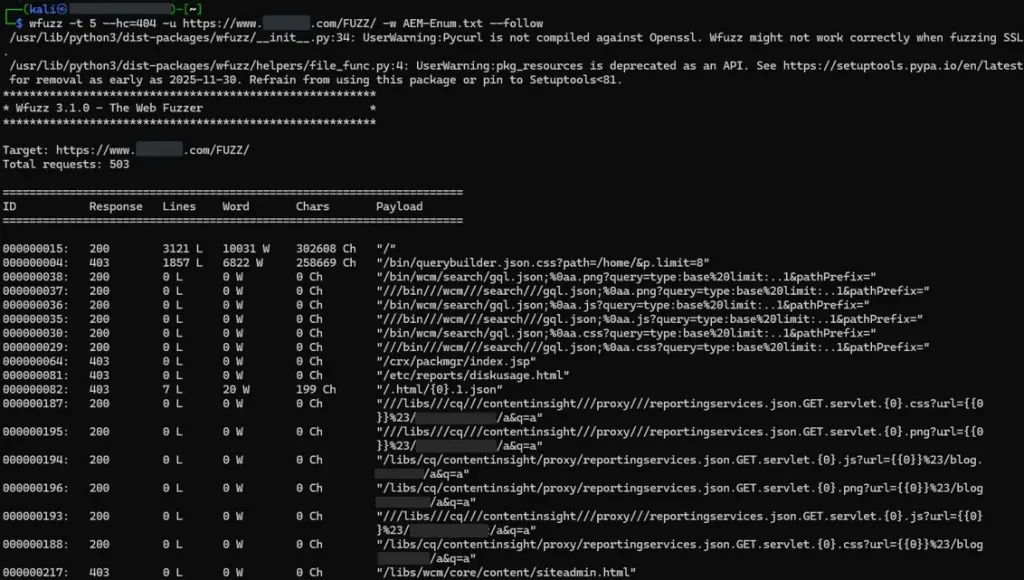
Image 2: Enumeration of directories and files in AEM
From this repository you can download the dictionary used to perform the previous directory enumeration:
Conclusion
AEM is a very complete enterprise platform, with an architecture that combines content management, reusable components, and multiple layers such as Author/Publish, JCR, OSGi, and Dispatcher. Despite having a steep learning curve, this allows companies to build a highly customizable application in which modules are integrated with custom developments.
However, this high level of customization also increases the attack surface and makes it more likely that an endpoint will be configured insecurely and left exposed without authentication. In AEM, even small configuration changes can have a major impact, as we saw earlier. That’s why penetration testing services are essential for verifying and reviewing all configurations to prevent information disclosure or even the execution of commands.
Finally, I hope this article has served as a guide when auditing a website in AEM environments, and if in your case you are developing an application based on this content management system, it is advisable to keep the situations described in mind to avoid reproducing the mistakes mentioned above.
References